
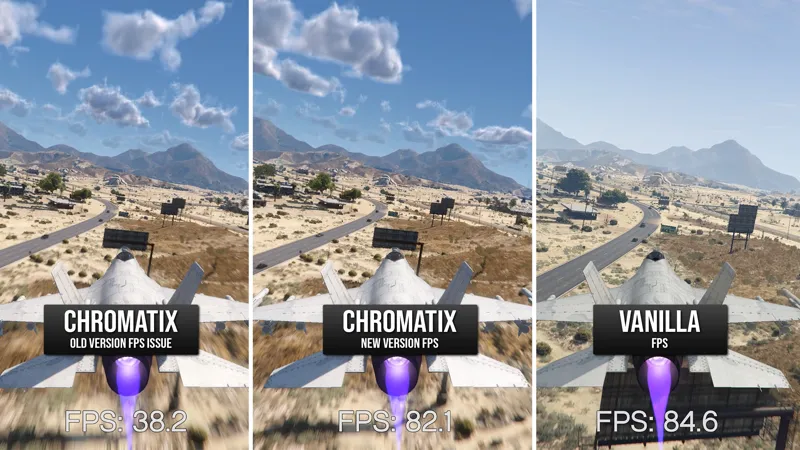
ChromatiX V2.9 Update 01-05-2026 [Legacy/FiveM]
Download New ChromatiX V2.9 Update 01-05-2026
chromatixmods.com/exclusive-downloads
Change Logs (Singleplayer & FiveM)
AMD users now see up to 2× FPS improvements, matching the gains Nvidia users received in the previous update.
The performance increase does not compromise the original ChromatiX graphics quality.
How To Install ⚠️
ChromatiX Legacy users can install this update over their existing version
ChromatiX FiveM users need to delete the old plugins folder and install the new one
If you enabled Windows 7 compatibility, you can now disable it and run GTA 5 normally
Set Post FX Settings to Very High or Ultra.
Comments (32)
WHATS THE SIZE OF THE MOD?
Hello i play gta 5 i drive a car first person is bug is motion blur can you fix is my English is bad (i use 2.9)
How to uninstall bruh
at night, the clouds are wayy too clear, they look like normal clouds you’d see during the day
When I Press The F7 key the ChromatiX menu not popping up.
ChromatiX Uninstaller.oiv corrupt i think
Great mod, everything looks great except for one thing...all my clouds are rendering through buildings. I'm sure this is something I've done on my end, just not sure where to start troubleshooting. Anyone ever run into that problem before?
only issue i have is in certain areas buildings blur up bad. seems to happen around pill box or all the way to the mall and several areas around that area
Hello bro , 0.8 doesn't work. Black screen with (back esc) button at the bottom right.
This happened with 0.7 too few months ago. Never been able to play it even once. 0.6 works fine
My clouds are too gray almost all the time. Also way too much dust in the city, I think it should be turned down by more than half in the city
I got this problem where the ReShade presets weren't working for me. Do you guys have any fix for this? Thank you!
How do I stop it from crashing I'm running Trace Gaming Desktop PC AMD Ryzen 7 9800X3D 2025 AMD Radeon RX 9070XT 16GB 32GB DDR5 RGB 2TB NVMe SSD Storage -
Would love to see the emergency lights boosted during the daytime, as they’re currently barely visible. At night, however, they seem overly bright, along with most other light sources in the game. Also, during nighttime performance drops by around 50%, which makes it nearly unplayable. Hopefully this can be looked into and improved in the next update. Thank you.
F7 menu not poping up in fivem
will this work for single player or is it only for FiveM?
Does this work with LSPDFR? / RPH Rage Plugin Hook
I take it this doesnt work with quantv?
yo can a gtx 1050 ti run this
whenever i have volumetric clouds on i have flickering white outlines around streetpoles and buildings for some reason
I love the way the clouds look, but I'm running into a major issue: the clouds disappear, and they only become visible again when I have the game paused. I'm using mods by JulioNIB, but I don't think that should have anything to do with it. Please, if anyone can help me with this problem. (The clouds only seem to work when I'm flying using the mods—it's strange.)
Post fx setting to very high or ultra
Hi, I’ve been trying to purchase ChromatiX, but all my payment methods keep getting declined every time. I’ve already tried multiple methods and cards, but nothing works. Is there any other way I can buy it or an alternative payment option available? Thanks.
hey guys if you want to fix lights issue, just use that mod ( Improved LED lights in MVGA ) its fix all lights issue from chromatix
Hi i just bought and installed this on my gta 5 legacy and everytime i load in the clouds are not there i tired restarting and all what can i do to fix my clouds please help
and nor do i have the dust or anything
just got this why is there so much dust in the city? and everything far away from me is highlighed in a shade of blue
how do you have the dust? i dont have the dust nor the clouds
My main issue is headlights and Street lights are overly bright but I also only run 4K
This will be resolved in an upcoming update in a few days!
Hi, I still face issues with Car Light intensity while PostFX is set to Very High or Ultra. Can you please check?
i am having the same issue