







C13 AEGIS 1.67 - Impact Vision, fog, grading options and fixes
Ladies and gentlemen it's a biggie. Cool new features post 1.65 public are coming in.
first:
Impact Vision
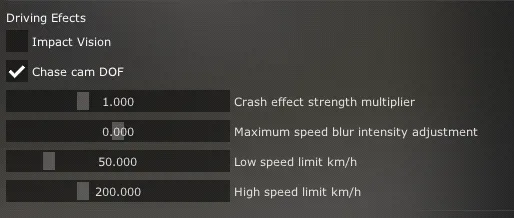
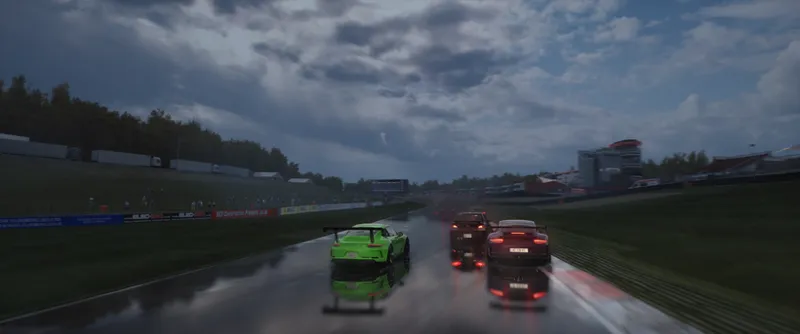
What started as a what if experiment has become a feature i use almost all the time while driving. Speed DOF like we first witnessed in NFS Shift is now available with C13 AEGIS. A simple toggle in pure config, with optional settings for minimum and maximum speed of the effect, crash effect intensity and intensity of the blur.
If you'd like to use the effect in chase and onboard cameras as well, keep "Chase cam DOF" enabled. Impact effects are active in all car cameras, but canot be used in f5, f7 and track cameras.
New tonemapping option
There are now three tonemapping presets to chose from: Flimic, Flat and Colorsafe. Perhaps a bit counter intuitively, Colorsafe is even flatter than flat. The purpose of this preset is to preserve darks and highlights, giving you more freedom to do post grading, if that's something you'd be looking to do.
Filmic curve
Colorsafe curve
But the tonemapping changes don't end there.
Enhanced overbright
C13 AEGIS never really did the tunnel exit blowouts as well as C13 Camera Obscura due to a different base setup of exposure, glare etc. But with a little tweak to tonemapping, this is now possible. Enable "Allow extreme Overbright" and get a retina melting white when leaving tunnels at daytime.
default settings
extreme overbright
And finally
Custom Fog
There's a new user adjustment toggle, which enables the first WIP version of a modified fog. While I'm sure peter's implementation is correct, so to speak, I feel like it leaves a bit to be desired vibe wise. SLXCK inspired me to take another look at it with his work on SKY, and having seen how great haze can look for my latest yt video I figured, why not. It's a very simple approach focused on tweaking rather than a full reconceptualization, and it mostly adds a bit more fog where I felt the stock look could use it.
Default Pure in heavy rain
C13 Implementation in heavy rain
That's it for the new stuff, additionally I tweak the glare presets a bit, fixed some missing glare preset mappings, finally found and fixed a divide by zero issue, and tried some code cleanup.
The post with the download for patrons will be up shortly, this is a bit of a changelog and a demo of the features currently being worked on.
As always, thank you so much for your support.
Comments (13)
I think the fog pictures arent working. At least they arent showing up to me
yes there seems to have been an issue on patreon and it deleted some images. i'll get them back up asap, thanks for reaching out
my c13 is completely broken with it being either overglared and whitened or just all the colours completely off, is there a fix?
yes, do not enable lightweight pp yebis replacement in weatherfx
How download?
https://www.patreon.com/posts/quick-fix-for-0-99546985?utm_medium=clipboard_copy&utm_source=copyLink&utm_campaign=postshare_creator&utm_content=join_link
Please also tweak the distance fog/haze in "normal" weather like "Few clouds", "Scattered clouds". I don`t understand why Pure removes all distance fog. It really makes AC look like it has absolutely no atmosphere. Other than that your filter is pretty much perfect for me - so thanks very much.
whats the discird
Good job, is it possible to add film grain as an option?
where do i get it
It's available in a separate post and on discord for tier 2 patrons
Ok i got the new build...where can i find all thise options i see above?
When can we test it? I have subscribed extra for dof! But there is no download....amazing work