

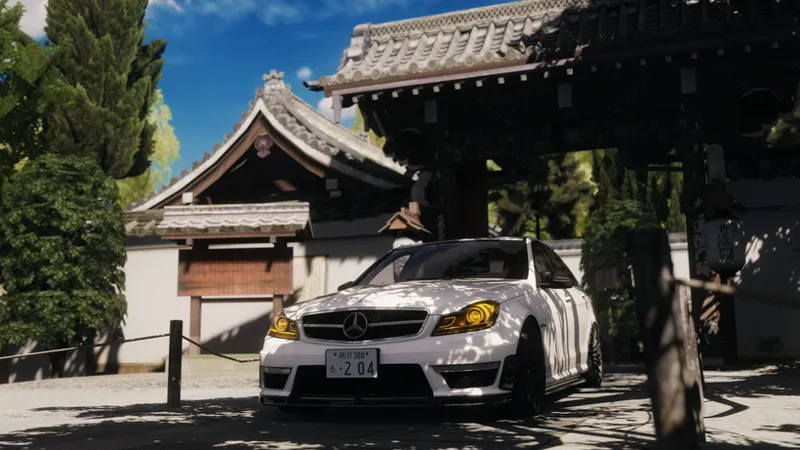


C13 AEGIS 2.05 for Pure 2.35
Hey guys. I hope everyone is doing well. So, Pure just dropped a huge update, bringing the version up to 2.35. This update brings some significant changes to the world lighting setup which required a thorough reconfiguring of C13 AEGIS to look, well, not shit. But, we're ready for this change and as such, C13 AEGIS 2.05 is upon us. While there are no earth-shattering developments, the adjustment to the new world lighting is significant and in hand with the changes required to fit the new paradigm, some rough edges of the visuals have also been smoothed out.
So what's been done for 2.05?
Well, beyond the standard affair of making sure visuals across the board remain top notch there are some changes that may impact your use of the filter.
Punchy is now the default tone mapping preset
Film grain has seen some changes, utilizing Pure's new ability to use uv coordinates in the tone mapping, and this should hopefully prevent banding in dark spots on the screen due to a better random calculation.
Saturation has been adjusted at script and tone mapping level to minimize oversaturation, which has predominantly affected reds.
Digital vibrance has been removed due to some issues, i'll see if i can fix that in a future update.
Screen calibration has been removed, since there's a better way of doing it via Pure Spice.
Added a minimum ambient brightness slider, which allows you to increase minimum night brightness, if you're struggling in the pitch black.
From left to right slider at 0, 50 and 100%
I consider LCS categorically superior to gamma at this point, with even car paints mostly looking good. If you have severe issues with 1.89 gamma on latest pure, lmk and i'll see what i can do.
As always thank you so much for your support, it means the world. And if you're wondering what the W204 C63 in the screenshots is doing, well, more info on that very soon.
Comments (28)
C13AEGIS 2.15 and is it free?
i just joined, where is the download link?
Either in the discord (which I strongly suggest joining), or in a post named "c13 aegis x.x download for patrons"
can i have the filter ?
where do i get free version
discord or overtake.gg
I signed up for 2nd tier, but I am asked to update to download 2.06
According to what i can see through Patreon, you are tier1
It's great to get access to comments for 1 euro. Cattle.
where do i get download for 2.05
https://www.patreon.com/posts/c13-aegis-2-06-117750097?utm_medium=clipboard_copy&utm_source=copyLink&utm_campaign=postshare_creator&utm_content=join_link
Ive been having issues using C13 on LCS 1.89. The Sun rays shining down on the road surface, car and grass are white instead of a natural color. I tried to adjust on pure config but no luck. Any ideas?
If you meant, you're trying to use C13 AEGIS 1.89 on Pure LCS, the answer is that C13 AEGIS 1.89, does not support Pure LCS
were can i download i just buy
comment je télécharge sa ne me propose pas alors que mon abonnement est de 1 euros
why wont it let me download this? i did the 1.50 membership and it keeps telling me upgrade to unlock
early access is available to T2+. While tier 1 doesn't officially get any early access, in practice it simply lags behind. But while CSP and Pure are in flux and changes are frequent and sometimes considerable, it may still be some time until 2.0 is available to T1
Love c13, but what map is that in the backround of the 1st and second pic?? looks good
1 is srp, 2 is Kyoto shore-in
Hello is this graphics support for Pure LCS 2.36?
yes
but how do i get LCS to look like this, everything is flat and the exposure contrast is either way over or way underexposed? the paint on the chameleon or metallic cars i have almost looks greyscale with no shift to it at all? what am i doing wrong?
Really do appreciate all the hard work you put into this, LCS is really starting to change the game now. Looks beautiful 😍
hye and thanks for your very good job from France! where can i download the file for the 2.05, i don't find any link....
https://www.patreon.com/posts/c13-aegis-2-05-117138741?utm_medium=clipboard_copy&utm_source=copyLink&utm_campaign=postshare_creator&utm_content=join_link
hi, I previously adjusted some filter settings in the PP settings within PURE Config, but now that page is gone in version 2.35 of PURE. How can I modify those settings, such as the Dashcam Mode for C13?
it's now in purePP a new app. this is a chenge brought by pure 2.35
Very impressive <3 great as always!