
⚙️ Passenger Routes (ETS2) & CargoLite — Load Order & FAQ
This post is the central setup guide for Passenger Routes and CargoLite – Cars & Vans. I’ll keep it updated and expand the FAQ as new questions come in.
📋 Recommended Load Order
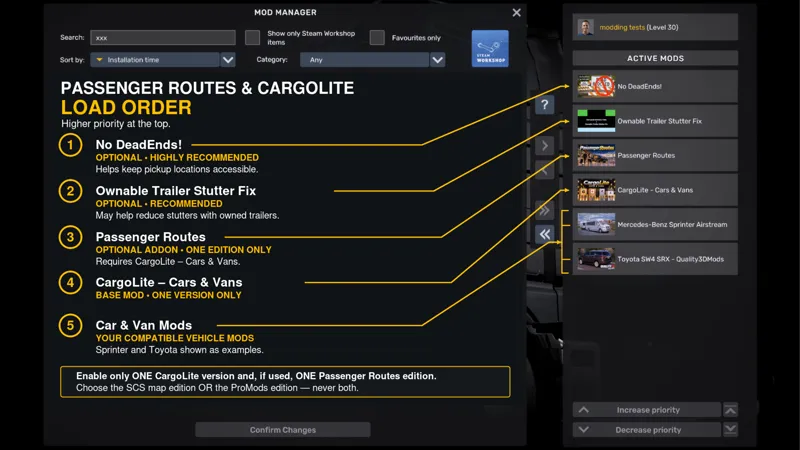
Arrange these mods with highest priority at the top, as shown in the attached image:
No DeadEnds! — Optional, but highly recommended.
Ownable Trailer Stutter Fix — Optional; recommended if you experience stuttering with owned trailers.
Passenger Routes — Enable one edition only.
CargoLite – Cars & Vans — Enable one version only.
Your compatible car and van mods.
The Sprinter and Toyota shown are examples. You can use other compatible vehicle mods.
For the ProMods edition, place Passenger Routes above your ProMods packages and keep the ProMods packages in their recommended order.
❓ Frequently Asked Questions
Can I activate both Passenger Routes editions?
No. Choose the edition matching your map setup: original SCS map OR ProMods. Never enable both together.
Should I keep older versions enabled?
No. Replace previous versions and keep only one CargoLite version and one Passenger Routes edition active.
Does Passenger Routes require CargoLite?
Yes. It uses CargoLite’s Car and Van trailers. CargoLite can also be used on its own for freight jobs.
Do I need the exact vehicles shown?
No. Vehicles are separate mods; the screenshot simply shows an example setup.
Is No DeadEnds! required?
It is optional, but highly recommended. Without it, invisible barriers may block access to some passenger locations.
What if I experience stuttering with a trailer attached?
The optional Ownable Trailer Stutter Fix may help. Follow its author’s installation instructions and check compatibility with any other economy mods you use.
Where do I find passenger jobs?
Purchase and attach a CargoLite Car or Van Trailer, then open the Cargo Market. All four passenger services support both trailers.
Why can’t I see passengers inside my vehicle?
The trailers are invisible and do not display passengers. People placed at pickup locations are decorative scenery.
🐛 Still having trouble?
Leave a comment below with your game version, map edition and a description of the issue. For location problems, include the location name and a screenshot. For crashes, please provide the game.log.txt from immediately after the crash.
Useful links
• No Dead Ends: Steam Workshop::No DeadEnds!
• Ownable Trailer Stutter Fix: Delivery Time Increase + Ownable Trailer Stutter Fix for Euro Truck Simulator 2 - TruckyMods
MarcOT
Comments (2)
Trailers break the transmission management in Jon Ruda’s RVM and Lord models. When a trailer is attached, the transmission refuses to shift gears in automatic mode—or it shifts in an unnatural way—requiring you to really force it by pushing hard on the accelerator.
from what I can remember jon ruda's mods are very high quality and complex. maybe thats the reason for it. I can try getting in touch with him asking him if it is fixable.