
THE SPECTRUM COLLECTION
[August 7th, 2026: MOD UPDATED TO THE LATEST PATCH 1.126, IF YOU UPDATED YOUR GAME, PLEASE DELETE THE OLD MOD VERSION AND REDOWNLOAD THE NEW BELOW!]
DOWNLOAD IT HERE!
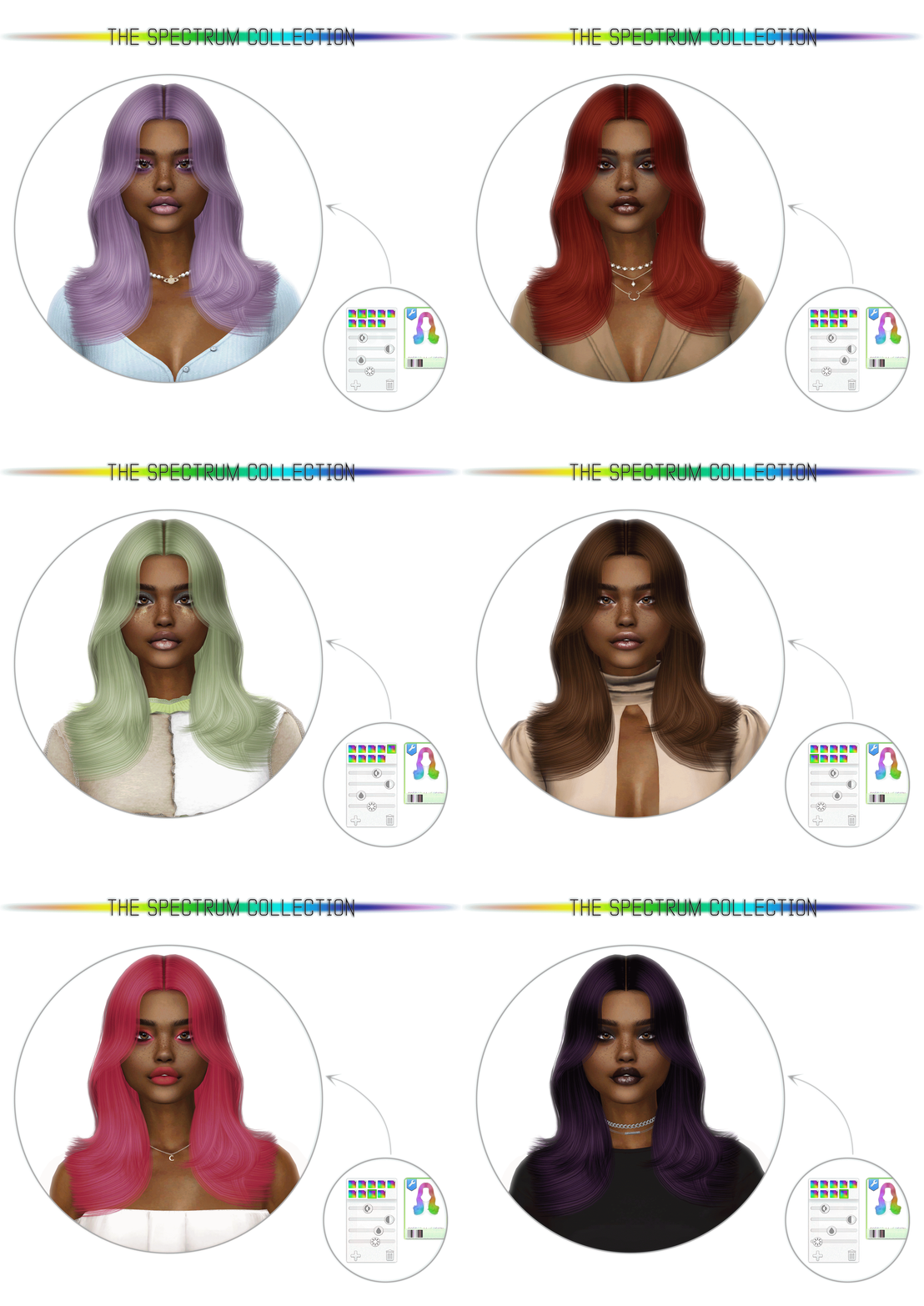
As we all know, the Sims 4 team has recently made an update to their game, where they allow the customization of make-up and genetics through sliders, which is an amazing step towards full customization capabilities for the game! Unfortunately, those sliders were only available for that and nothing else, until a group of modders created a mod that unlocks these sliders for pretty much all categories!
So today, I'm introducing "The Spectrum Collection", a separate, optional "Spectrum Version", for all my future releases, that will work with the color slider, which is unlocked with the mod that I'll be linking below!
If you're already familiar with the sliders, this won't be anything different for you! But still, I made a picture explaining what each slider and buttons do!

1 - Hue Slider - Controls the color.
2 - Opacity Slider - Do not touch this slider, it should always be kept at max, otherwise it will make the hair transparent!
3 - Saturation Slider - Controls the intensity of the color, from gray to very vibrant.
4 - Brightness Slider - Controls the lightness of the color, from dark to light.
5 - Save Swatch button - This button allows you to save custom colors of your choice, always save a color when you're done customizing it, so you don't lose it!
6 - Delete Swatch button - This button allows you to delete a previously saved color swatch.
7 - Swatches Menu - This opens up the swatches & color slider menu, click it to open and close when necessary.
Some important tips & information:Unfortunately, this doesn't mean that ALL content will work with the sliders, special files need to be made for them to work correctly;
The new menu & color sliders ONLY work on slider enabled creations, which in my case will be the Spectrum creations;
Items from the Spectrum Collection only have 1 swatch, which is a blank canvas and all you need to create an endless number of colors;
You can have both normal and Spectrum versions in game:
- For my regular hairs, with 54 colors, use the TOP swatches, that you've always used to change hair color, if you use the new swatches & slider menu at the bottom, nothing will happen nor the color will change;
- For items from the Spectrum Collection, use the BOTTOM swatches, that are located on the menu below the thumbnail picture;Make sure your game is updated, this mod will only work with games that are updated to the latest version.
All you need to make this work in your game is to download the file (named "thepancake1_ColorSlidersUI_EnableSliders_v4e.package" or/and ""thepancake1_ColorSlidersUI_EnableEyebrowSliders_v4e.package") and put it in your mods folder, just like any other CC!
DOWNLOAD IT HERE!
Big thanks to thepancake1 and MizoreYukii, the creators of this mod, without them, this wouldn't have been possible! ♥
Also, big thanks to timmssimms, for letting me use their beautiful sim Caz! ♥
The Spectrum versions are quite small in size, but give you an endless number of possibilities, it's super cool and a great addition if you want to create your own colors! If you guys enjoy how this system works, I can even start making Spectrum versions for clothing! So let me know what you think below!
Hopefully that explains everything, but if you have any other question or need further help, please let me know! ♥
Comments (60)
I can't find the download...
Hey! You can download the spectrum mod as an attachment at the very bottom of the following post: https://www.patreon.com/thepancake1/posts/157258822
Since the game was updated, I've had to play without mods because they broke my gameplay. When will the game be updated again?🎀
Hey! The color slider mod needs to be updated by the mod creator Thepancake1, once it’s updated I’ll update the post here on Patreon! Until then you can just delete the color slider mod file and your game should work normally without it!
It doesn't work for me and is bugging the main menu
Hey! I’m not the mod creator, the mod is made by ThePancake1! You need to update the mod along with game updates, so please update your game and mod so it works properly!
When will there be an updated version for March 2026? After the update, the mod does not work.
Hey! I’m not the mod creator, the mod is made by ThePancake1, we need to wait for the creator to update it, so it works with the new update! I’ll update this post once that happens 😌
Ur hair is my fave! Is the colour slider compatible with the Feb patch? ♡♡
Thank u!! Yes it is, just make sure you download the latest version from the link above! :)
Hi! I installed the color sliders mod and downloaded a bunch of your hairs that are compatible with this mod. But when I move the sliders towards the left, it does nothing. The slider works normally for basegame hairs, etc, but every time I try cc hair, it stays blonde, or I can only do blue or orange. I'm trying to get a dark brown, but no matter what I try, it won't work :(
Hey! Everything is working fine as far as I know! If you check the picture in this post, there’s 4 sliders, it seems you’re just using the first one, the hue! If you use the 3rd and 4th they will change the saturation and brightness, which allows you to turn your color into darker natural tones! But, in case you don’t know how, you can always download the main version for each hairstyle that has 54 shades by clicking the link at the top of each post, maybe you’ll like them if you don’t want to customise a color!
hi! do you know when the creator of this mod is going to update? it's broken :(
Hey! The mod is working for me, apart from some issues when browsing the gallery. Hopefully ThePancake1 will update it soon, I'll update this post once that happens, so if you're a member, you should receive a notification!
Hi, I can't seem to make any colours on the left side of the hue spectrum - the darkest red hue I can get is bright orange. Is this a bug? I know how to adjust the saturation and brightness to make other colours but I have dark red (magenta-esque) hair and can't make anything close to that. :( For now, I have gone back to the normal version of the hairs.
Hey! That's weird, just tested everything and it seems to be working fine! Do you have the color slider mod updated? If yes, can you try messaging me with more details, like the hair in question, the color you want, etc, so maybe I can help you out, please let me know! ♥
Hi! 'm just curious does this interfere with the more collum's mod I added the slider in and now I only have 2 collum's and the more collum's mod is updated and so is the color sliders.
Hey! The color slider mod works with the more columns mod, but you need to download the compatible version, if you click the link at the top of this post it will lead your to the modders ThePancake1’s Patreon post, which has two attachments to download, the standard version and the more columns mod compatible version! 🙂
hi, the mod isn't working, after update in game.
Hey, sorry about that, we are waiting for an update from the creator, once it's up, I'll update this post to remind people to update it :)
hii sorry to bother but do you have a video explaining how to do it? bc all the times i tried to use this mod (i redownloaded each time) the color wheel didnt work, it's stuck in blonde and i can never get "normal" colors like brown or black, just blonde or bright blue/green
Hey! If you check the picture in this post, there’s 4 sliders, it seems you’re just using the first one! If you use the 3rd and 4th they will change the saturation and brightness, which allows you to turn your color into darker natural tones! But, in case you don’t know, you can always download the main version for each hairstyle that has 54 shades, maybe you’ll like them if you don’t want to customise a color!
hii just wanted to know if i need to download the mod for each hair or just once?
Hey! You download the color slider mod just once, then you need to download the Spectrum version of each file so it works with the color slider mod!
Hi! I'm a bit confused on if I've done something wrong but I only have 1 swatch and I can have black and brunette hair, so I was wondering if you could help? thank you :)
Hey! You're downloading the Spectrum version to use with the color slider mod, to download the main version with 54 colors, you need to click the big text at the top of each post that says [CLICK HERE TO DOWNLOAD - MAIN FILE] 😊
Hey, thanks for yours CC ! We need to update. Sorry for my english i'm french girl :) xoxo
This mod is now broken. after yesterday's update it caused my entire build/buy catalog to be completely blank.
We need to wait for the mod creator to update it! I'll update the post to notify you once that happens :)
thankyou:D i managed to figure it out after i posted this:Dxx
do you need to use the sliders? id rather just have hairs with the 54 colour swatches:)
Not at all! If you read each post, there’s a link at the top that says “CLICK HERE TO DOWNLOAD - MAIN FILE” and leads to the download for the main version, the Patreon files are only for color slider/toddler and child versions!
Slay bb
Hiii, for me the 7 colour swatches dont show up in game (so I can't make hair brown and black and so on), even though I downloaded the latest colour slider mod and everything correctly so I wanted to ask if anyone knows how to correct that :)
Did you download the Spectrum version of each items? You need to use this on the items that say spectrum version and have a rainbow thumbnail!
Just wanted to let you know so others may know the issue as well that thepancake1 mod has been glitching my game making it accessible but unplayable x
Hey! Have you updated the mod recently? to the latest version 1.102? You should comment on thepancake1 patreon post, if there's an issue I'm sure they will be happy to fix it!
I love this so much! Where's the skin from? x
Thank you! I'm not sure since the Sim was a gift from a friend, from almost 2 years ago, I don't have it anymore to check, sorry!!
I am sorry if I am blind lol I don't see the download button for the updated spectrum
At the bottom of the post there's "DOWNLOAD IT HERE!" link that will take you to the mod page, which you can scroll to the bottom and download the attachment called something like "thepancake1-ColorSlidersUI.package" Here's the link: https://www.patreon.com/posts/color-sliders-62823244
If I download the Spectrum Version does it also include the basic, natural colors? Or should I download both the normal AND spectrum files?
Hey! No, the Spectrum version only has one recolorable color that you can change to your liking. To have the 54 basic colors you need to download the normal file!
thank you :D
I regret downloading this because I am now obsessed with it!!
I'm about to download this, and join in your obsession lol.
hi this is amazing ! however i don't understand why I can't see the swatch options below the thumbnail of the hairstyles. my game is up to date and so is the mod. what could be wrong?
Hey! Thank you! I'm not entirely sure I understand your issue. But make sure you're using the bottom swatches only for the Spectrum Versions, for normal hairs, use the top ones! You need to click the little window below the thumbnail to open the menu, and you'll have just 1 rainbow swatch, for other swatches to appear, you need to click the "+" button to save the colors you want!
This is absolutely amazing! I can't wait for the opportunities!!
This work is amazing! I love your work every time ❤️ ❤️
Oh my God they did it!! Thank you for sharing this❤️❤️❤️❤️❤️❤️
💜💜💜
This is so exciting! Thanks for putting in so much work 🥰 Can’t wait to try it out!
Hope you like it!! ❤️
I love this, thank you so much for your hard work, now we have even more options!!! 💕
❤️❤️
my bb <3 i love this so much, and the idea is truly going to lead to hours of fun in cas! looking forward to future releases! <3
Thanks for your beautiful doll Caz ♥
Ahh!!!! I love this!!!
♥♥